
VPS Hosting
Cloud VPS vs Performance VPS: Which One Actually Fits Your Workload
Hordanso sells two VPS lines, and at every size the two have the same number of vCores and the same RAM. So what are you really choosing between, and when is the difference worth paying for? This guide answers that with the real plan specs, not a generic comparison.
Last updated: October 2026
Key Takeaways
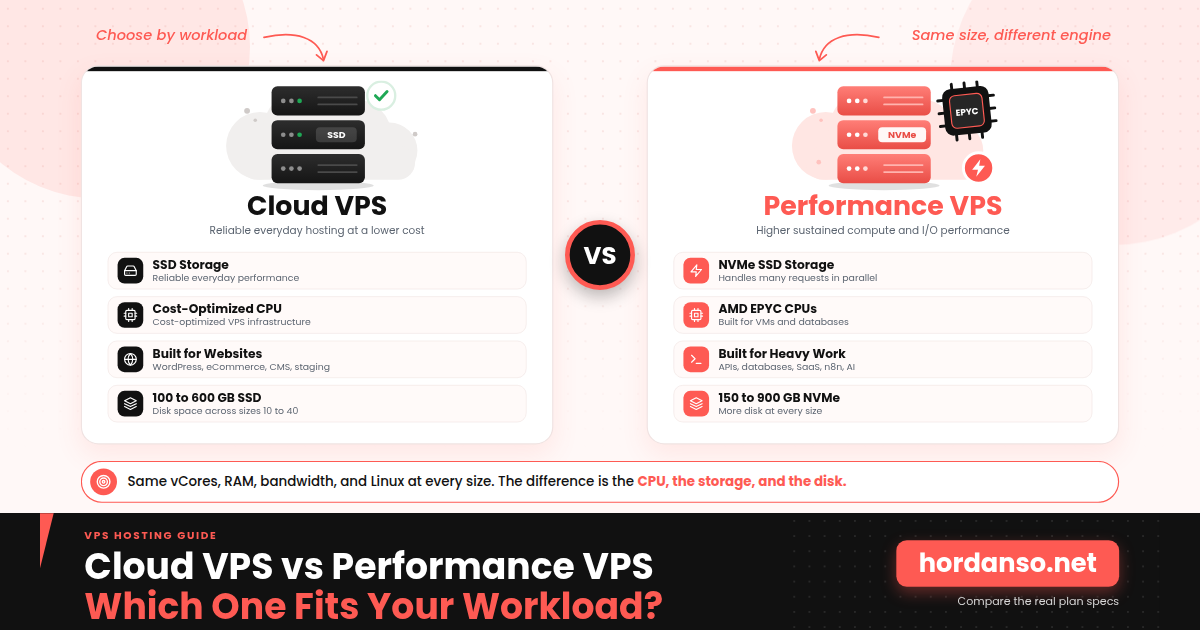
- At every size from 10 to 40, Cloud VPS and Performance VPS list the same vCores and the same RAM. The differences are the CPU class, the storage type, and the disk size.
- Cloud VPS uses SSD storage and fits business websites, WordPress, online stores, and general applications.
- Performance VPS uses AMD EPYC processors with NVMe storage and fits databases, production APIs, n8n automation, and AI workloads.
- Measure before you choose. Disk wait and CPU load on your current server show which resource is actually holding you back.
The Short Answer First
Choose Cloud VPS if the server will mostly run business websites, WordPress, online stores, or general-purpose applications. Choose Performance VPS if it will run databases, production APIs, n8n automation, or AI agents, where fast storage and steady CPU power decide how the workload feels. Both lines are Linux servers managed over SSH.
What a VPS Actually Is
A virtual private server is a virtual machine that runs on a physical server. A layer of software called a hypervisor divides the hardware into isolated environments, and each one gets its own operating system and its own allocation of CPU, RAM, and storage. As Wikipedia’s article on virtual private servers points out, those environments still share the underlying physical hardware, so performance can vary with what other virtual machines on the same host are doing.
That detail shapes how to read this comparison. Neither line turns a VPS into a dedicated machine. The useful question is not which one is faster in the abstract. It is which resources your workload leans on hardest.
The Two Lines Side by Side
Here are the plans as listed on Hordanso’s VPS Hosting page. Prices are left out on purpose, because the page shows them in your local currency and they can change.
| Size | Cloud VPS (SSD) | Performance VPS (AMD EPYC, NVMe) |
|---|---|---|
| 10 | 4 vCores, 8 GB RAM, 100 GB SSD, 1 snapshot | 4 vCores, 8 GB RAM, 150 GB NVMe SSD, 1 snapshot |
| 20 | 6 vCores, 12 GB RAM, 200 GB SSD, 2 snapshots | 6 vCores, 12 GB RAM, 300 GB NVMe SSD, 2 snapshots |
| 30 | 16 vCores, 64 GB RAM, 500 GB SSD, 3 snapshots | 16 vCores, 64 GB RAM, 750 GB NVMe SSD, 3 snapshots |
| 40 | 18 vCores, 96 GB RAM, 600 GB SSD, 3 snapshots | 18 vCores, 96 GB RAM, 900 GB NVMe SSD, 3 snapshots |
Every plan on both lines includes 32 TB of bandwidth plus unlimited incoming traffic, according to the plan listings. Read the table row by row and one thing stands out: the vCores and RAM are identical at each size. Take size 20 as an example. Cloud VPS 20 gives you 6 vCores, 12 GB of RAM, and 200 GB of SSD storage. Performance VPS 20 gives you the same 6 vCores and 12 GB of RAM, but with an AMD EPYC processor and 300 GB of NVMe storage. Moving between the lines does not buy a bigger server. It buys a different kind of CPU, faster storage, and more disk for that same size.
What Actually Changes Between the Two Lines
- The processor. Cloud VPS runs on cost-optimized infrastructure, while Performance VPS uses AMD EPYC processors. AMD’s own EPYC server CPU overview states that these processors are built to perform well for virtual machines, databases, and other enterprise applications, which is the kind of work the Performance line is aimed at.
- The storage. Cloud VPS uses SSD. Performance VPS uses NVMe SSD. IBM’s technical comparison of NVMe and SATA explains that NVMe gets much of its advantage from handling many storage requests in parallel instead of one after another, which is why it helps most when many reads and writes happen at the same moment.
- The disk size. Performance VPS includes more storage at every size: 150 GB against 100 GB, 300 against 200, 750 against 500, and 900 against 600.
- What stays the same. The vCores, the RAM, the bandwidth, the number of included snapshots at each size, and the Linux operating system.
| Feature | Cloud VPS | Performance VPS |
|---|---|---|
| Best for | Websites, WordPress, eCommerce, general hosting | APIs, databases, SaaS, automation, AI workloads |
| CPU | Cost-optimized VPS infrastructure | AMD EPYC performance CPUs |
| Storage | SSD | NVMe SSD |
| Performance profile | Reliable everyday performance | Higher sustained compute and I/O performance |
| Ideal workload | General-purpose workloads | Compute-intensive workloads |
Which Workloads Fit Which Line
Hordanso’s VPS page splits the decision by workload rather than by price. Here is that split in one place.
| Choose Cloud VPS if you need | Choose Performance VPS if you need |
|---|---|
| Business websites and WordPress | High-traffic websites and applications |
| eCommerce stores | Production APIs |
| CMS platforms | Databases under heavier load |
| Development and staging environments | SaaS and multi-tenant applications |
| Email and file servers | CI/CD and development pipelines |
| General-purpose web applications | n8n and automation workloads |
| Reliable VPS hosting at a lower cost | AI agents and AI orchestration |
The page also names any application that needs faster storage and sustained CPU performance as a fit for Performance VPS. If automation is your main job, Hordanso runs dedicated pages for N8N VPS and the OpenClaw AI Agent VPS, which are worth a look before you size a general-purpose server for the same work.
How to Tell Whether Your Server Is Waiting on Disk or CPU
If you already run a server, you do not have to guess. Three standard Linux tools give you a clear picture after a few minutes of watching a busy period.
- Run
topand look at the CPU summary line. Theusandsyvalues show time spent running programs, andwashows time the CPU spent waiting on the disk. - Run
vmstat 1and watch thewacolumn over several seconds during your busiest hour, not at midnight. - If the
sysstatpackage is installed, runiostat -x 1and watch the disk utilization and wait time for your main disk.
Then read the pattern. A busy CPU with little disk wait points toward a compute limit. Consistently high disk wait while the CPU sits partly idle points toward a storage limit, which is where NVMe helps most. If neither looks stressed, the slowdown probably comes from application settings, missing caching, or slow database queries, and a bigger server will not fix it.
Quick Self-Check: Which Line Matches Your Workload?
Answer honestly. Several Yes answers to the first four questions point toward Performance VPS. If the last question describes your main use, Cloud VPS is probably the better fit.
| Question | ✓ Yes | ✕ No |
|---|---|---|
| Will the server run a database that handles many reads and writes at the same time? | ✓ | ✕ |
| Do you run production APIs that need steady response times under load? | ✓ | ✕ |
| Will n8n workflows or AI agents run on it around the clock? | ✓ | ✕ |
| Does your current server show consistently high disk wait or sustained CPU load at busy hours? | ✓ | ✕ |
| Is the server mainly for a business website, a WordPress site, or a store with moderate traffic? | ✓ | ✕ |
What Happens When You Pick the Wrong Line
- A small business site lands on a Performance VPS because bigger sounded safer, and the extra storage speed is never really used
- Or a busy database lands on a Cloud VPS, and queries start slowing down at exactly the hours that matter most
- The team assumes the application code is at fault and spends days tuning software
- The real cause, a mismatch between the workload and the hardware, only shows up once someone measures disk wait and CPU load
- Measuring first, using the three commands above, avoids the whole loop
Key Terms, Explained Simply
- vCore
- A virtual CPU core that the hypervisor allocates to your server, representing a share of the physical processor’s capacity.
- Hypervisor
- The software that divides one physical server into isolated virtual machines and allocates resources to each of them.
- NVMe
- A storage protocol designed for solid state drives that can handle many requests in parallel.
- Snapshot
- A saved point-in-time state of your server that you can roll back to, useful before a risky change.
- Root access
- Full administrative control of the server’s operating system, which lets you install and configure software freely.
- SSH
- Encrypted command-line access to your server, the standard way to manage a Linux VPS.
Linux Only: What About Windows and Remote Desktop?
Both lines run Linux and are managed over SSH from the command line. Hordanso’s VPS page states that they do not support Windows Remote Desktop or a graphical desktop. If you need to run Windows software such as .NET or SQL Server, or you want an RDP desktop, the right product is Hordanso’s Windows Server hosting, not either of these two lines.
Not sure which line fits your workload?
Talk to Our TeamFrequently Asked Questions
Cloud VPS runs on cost-optimized infrastructure with SSD storage and suits websites, WordPress, online stores, and general applications. Performance VPS uses AMD EPYC processors with NVMe SSD storage and suits databases, production APIs, automation, and AI workloads. At each size the vCores and RAM are the same.
No. At every size from 10 to 40, both lines list the same number of vCores and the same RAM. The differences are the processor type, the storage type, and the amount of disk space, which is larger on Performance VPS at each size.
Hordanso lists WordPress, eCommerce, and business websites under the Cloud VPS line. Whether size 20, with 6 vCores, 12 GB of RAM, and 200 GB of SSD storage, is enough depends on your traffic, plugins, and database size. Check CPU load and memory use on a busy day before deciding to size up or down.
Hordanso lists n8n and automation workloads under Performance VPS. A small setup with a few occasional workflows may not stress storage much, while always-on, high-volume automation benefits from fast storage and steady CPU performance. Hordanso also has a dedicated N8N VPS page if automation is your main use.
No. Both lines run Linux and are managed over SSH. For Windows applications, .NET, SQL Server, or a Remote Desktop session, use Hordanso’s Windows Server hosting instead.
Hordanso’s VPS page states that provisioning takes between 10 and 30 minutes.
Not exactly. A snapshot saves the state of your server at one moment so you can roll back, which is useful before a risky change. Snapshots are generally kept on the same infrastructure as the server, so they work best as a quick rollback point rather than your only copy. Hordanso’s VPS page lists included snapshots and daily backups as separate features.
Sources and Further Reading
- Wikipedia: Virtual private server, for how a hypervisor divides a physical server and why shared hardware can affect performance.
- IBM: NVMe vs SATA, for how the NVMe protocol differs from older storage interfaces.
- AMD: EPYC server CPUs, for what the EPYC processor family is designed to run.
- Hordanso VPS Hosting, for the current plan specifications and pricing in your currency.


