
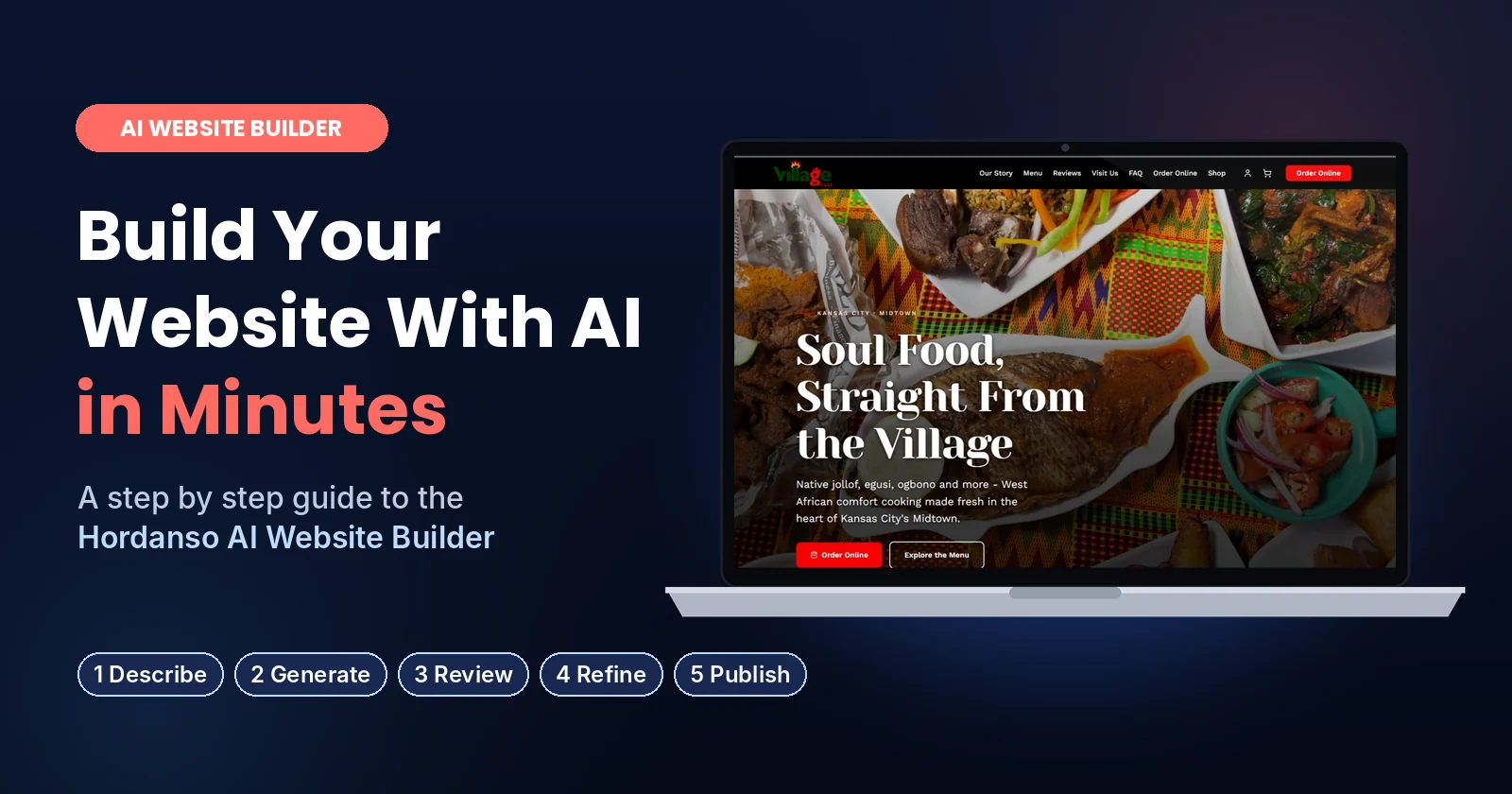
AI Website Builder
How to Build a Website With Hordanso AI in Minutes: A Step by Step Guide to the Hordanso AI Website Builder
You do not need a developer, a big budget or weeks of back and forth to get your business online. With the Hordanso AI Website Builder, you describe your business in a few sentences, the AI builds a professional WordPress website for you, and you keep improving it by simply asking for changes. This guide walks you through every step, with real screens from the builder, so you know exactly what to expect before you start.
Last updated: November 2026
Key Takeaways
- You build your site in five steps: describe your business, let the AI generate it, review the draft, refine it with AI prompts, and publish.
- Your business description can be up to 500 characters, about 80 to 100 words. The clearer it is, the better your first draft.
- The builder shows its progress live and usually finishes your first version in 2 to 4 minutes.
- Your site is a real WordPress website, so you can keep editing it with AI prompts, your own photos and a live preview long after launch.
- You can try everything first with the 3 day free trial before choosing a paid plan.
The Short Answer First
To build a website with the Hordanso AI Website Builder, you enter your business name, choose your business type and write a short description of what you do. The AI then sets up WordPress, studies your details and writes your website copy. In a few minutes you have a complete first draft that you can review, refine with plain English requests such as “make the headline shorter” or “add our opening hours”, and publish when you are happy with it.
What You Need Before You Start
Five minutes of preparation saves you time and AI credits later. Have these ready before you open the builder.
- Your business name exactly as you want customers to see it.
- A clear description of what you sell, who you sell to, where you are and the tone you want. More on this in Step 1.
- Your contact details: phone number, WhatsApp number, email, address and opening hours.
- A few good photos of your products, your space or your team. Real photos build more trust than stock images.
- Your logo, if you have one. If you do not, the AI logo maker included with every plan can help.
Step 1: Describe Your Business
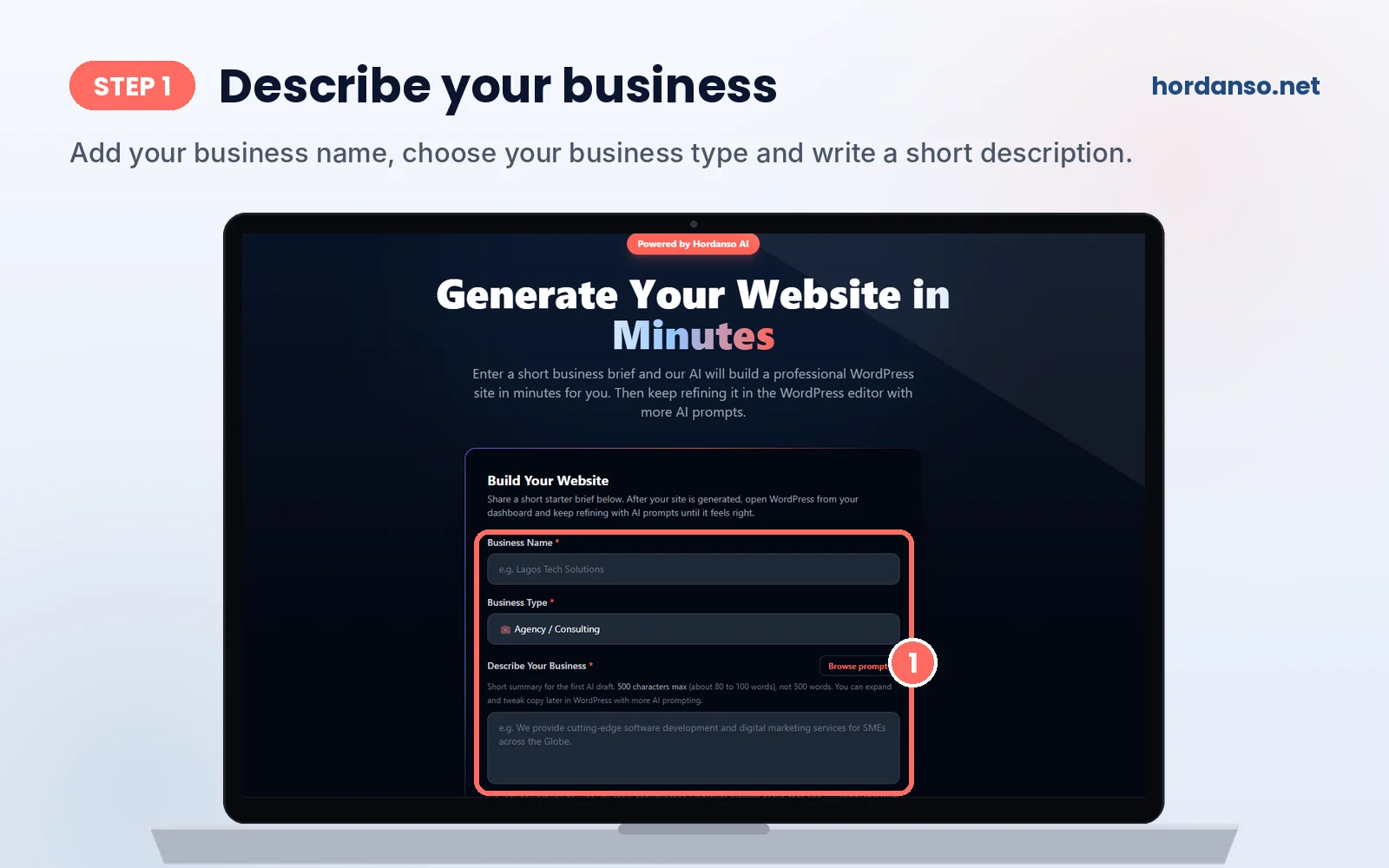
Open the Hordanso AI Website Builder and fill in the Build Your Website form. It asks for three things:
- Business Name: for example, “Lagos Tech Solutions”.
- Business Type: pick the option closest to what you do, such as Agency or Consulting.
- Describe Your Business: a short summary for the first AI draft, up to 500 characters, which is about 80 to 100 words.
The description is the most important part, because the AI writes your pages from it. A good description answers four questions: what do you offer, who are your customers, where are you based, and how do you want to sound? If you are stuck, click Browse prompts on the form to see sample descriptions you can adapt.
Example descriptions you can adapt
| Business | Example description (under 500 characters) |
|---|---|
| Restaurant in Lagos | Mama Ronke’s Kitchen is a family restaurant in Surulere, Lagos serving jollof rice, ofada stew, pounded yam and pepper soup. We offer dine-in, takeaway and delivery across Lagos Mainland. Our customers are families and office workers who want home-style Nigerian food. Tone: warm, homely and proud of our recipes. |
| Fashion brand | Adire House is a Nigerian fashion brand in Abeokuta selling handmade adire fabrics and ready-to-wear outfits. We ship across Nigeria and abroad. Our customers are young professionals who love modern African style. Tone: stylish, confident and proud of our culture. |
| Law firm in Abuja | Okafor and Partners is a corporate law firm in Abuja helping small businesses with company registration, contracts, trademarks and dispute resolution. Our clients are founders and growing companies who need clear legal advice. Tone: professional, trustworthy and plain spoken. |
| School in Port Harcourt | Bright Steps Academy is a nursery and primary school in Port Harcourt with small class sizes, a child-centred approach and after-school care. Parents can book a school tour online. Tone: caring, safe and encouraging. |
These are examples only. Replace the names and details with your own, and keep the same structure: what you offer, who it is for, where you are and your tone.
Step 2: Let the AI Build Your Site
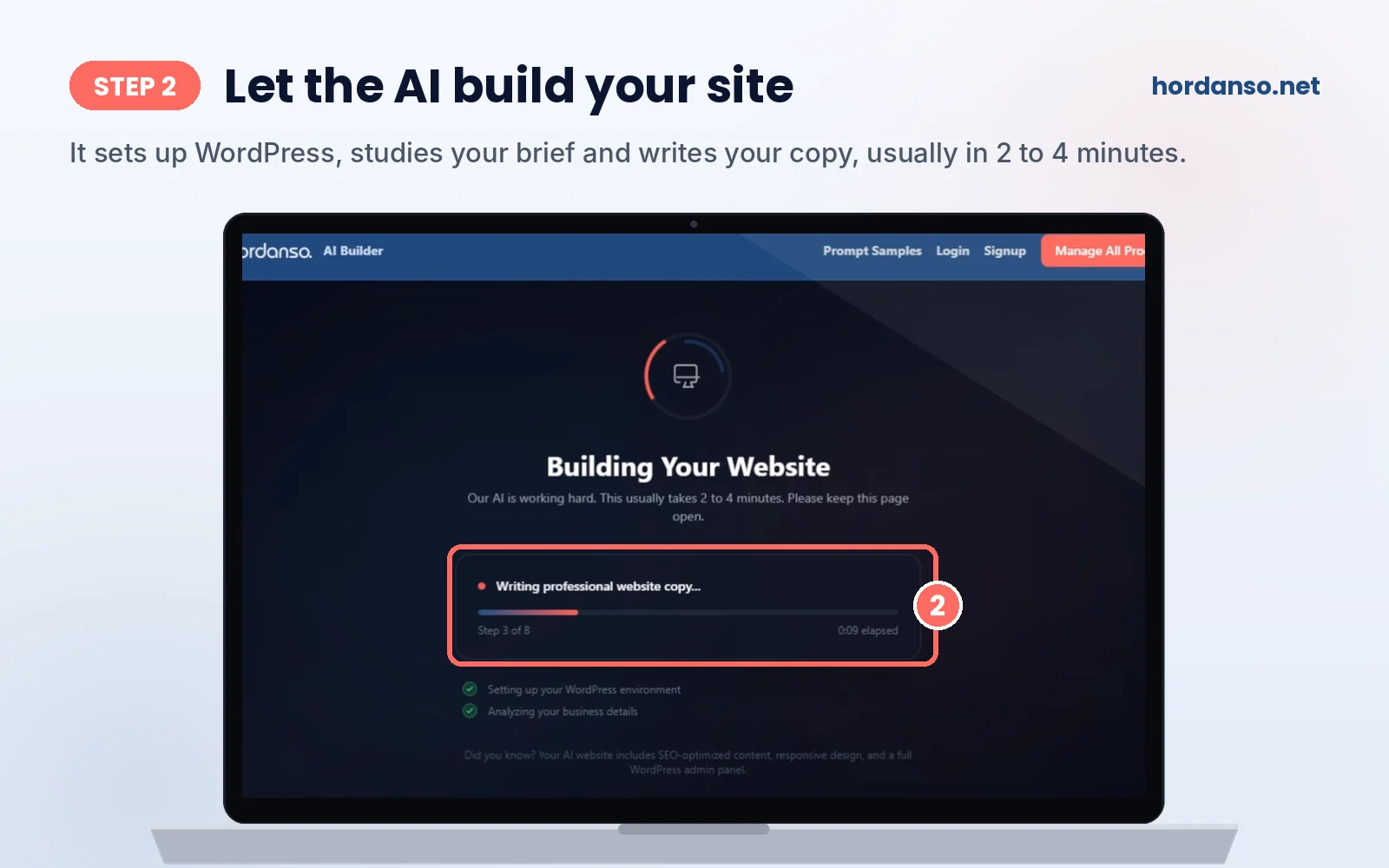
Once you submit your brief, the Building Your Website screen appears and the AI gets to work. You can watch each stage as it happens, with a progress bar and a step counter. Along the way it sets up your WordPress environment, analyses your business details and writes professional website copy for your pages.
The screen itself tells you that this usually takes 2 to 4 minutes, so keep the page open while it finishes. This is a good moment to gather the photos and contact details from your checklist.
Step 3: Review Your First Draft
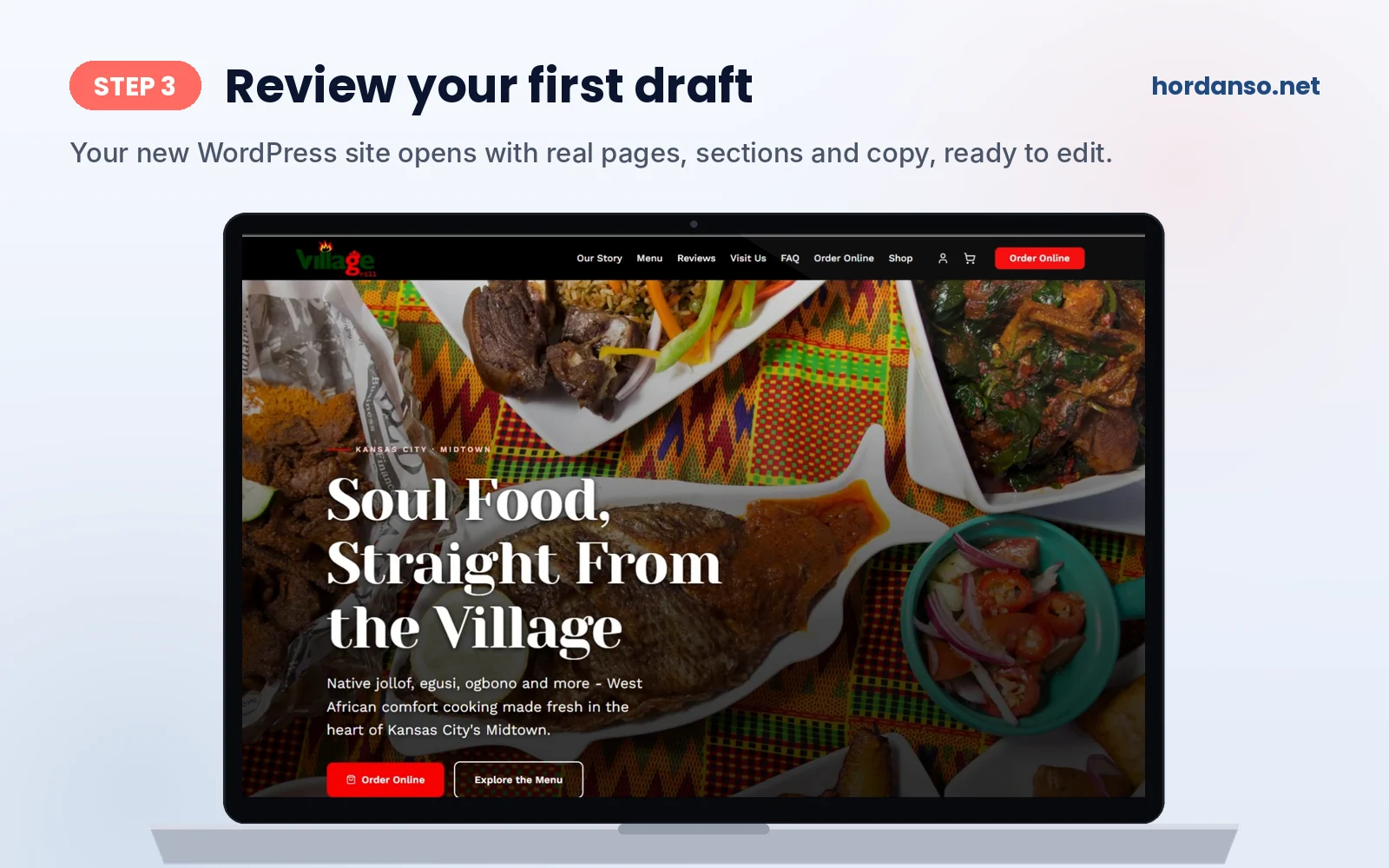
When the build finishes, you get a complete WordPress website with a navigation menu, headlines, sections and copy written for your business. The example above is a restaurant site with menu, reviews and online ordering sections, all created from a short description.
Read through your draft as if you were a customer seeing it for the first time. Make a short list of what to change: wrong details, placeholder images, sections you do not need, or text that does not sound like you. You will fix all of it in the next step.
Step 4: Refine It With AI Prompts
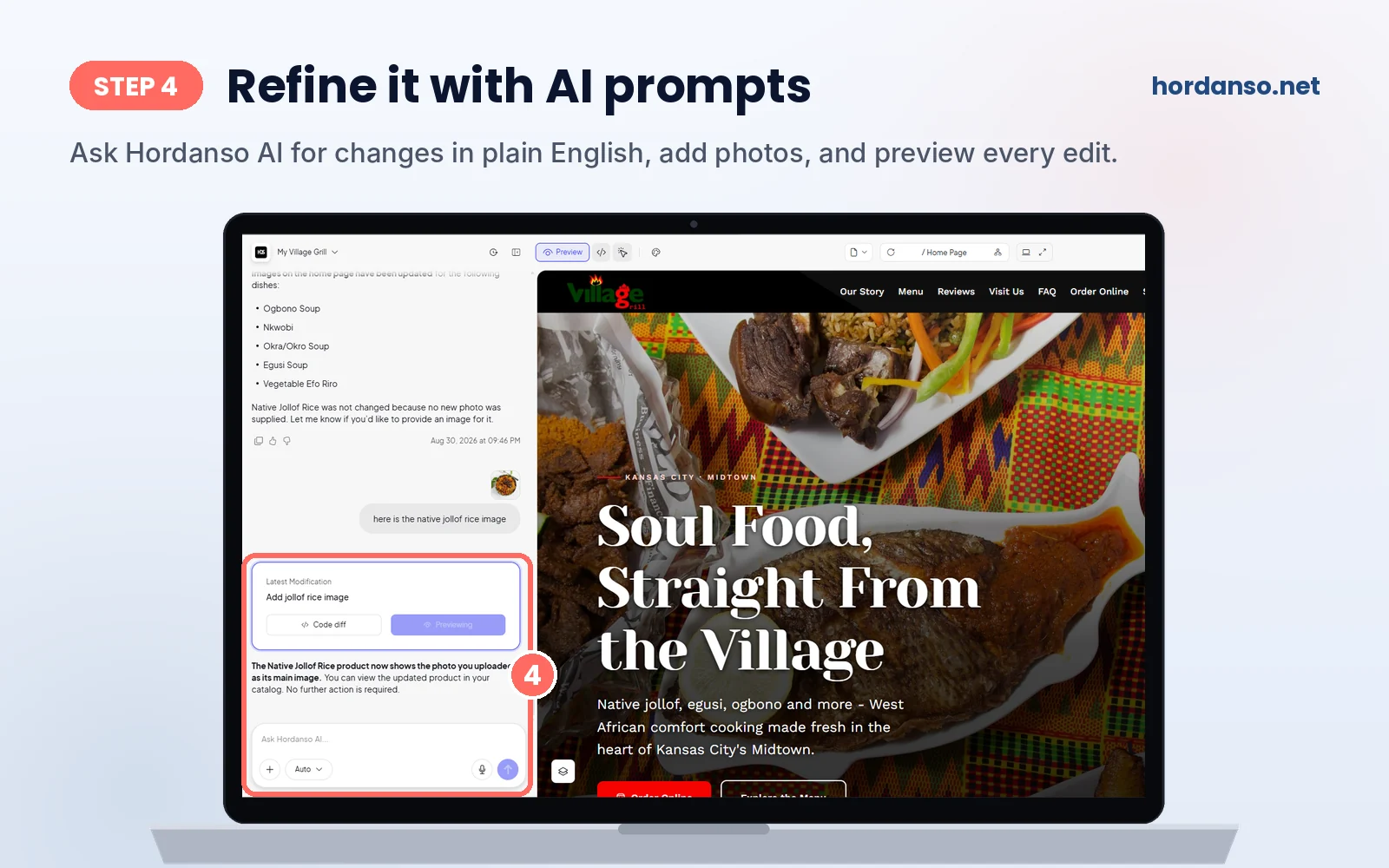
This is where your site becomes truly yours. The editor shows a chat panel on the left and a live preview of your website on the right. Type what you want in the Ask Hordanso AI box, in plain English, and the AI makes the change for you.
- Add your own photos. Use the plus button to attach an image and tell the AI where it belongs. In the example above, the owner uploaded a photo of native jollof rice and the AI set it as the main image for that product.
- See every change. After each edit, a Latest Modification card shows what was changed, with a Code diff button and a preview, so nothing happens without you seeing it.
- Check every page. Use the page selector at the top to move between your home page and other pages, and switch views to see how the site looks on different screens.
- Test safely. Every plan includes a staging environment, a private copy of your site where you can try bigger changes before visitors see them.
Prompts that work well
| What you want | What to type |
|---|---|
| A shorter, stronger headline | “Make the home page headline shorter and more direct, under eight words.” |
| Your real contact details | “Add a contact section with our phone number, WhatsApp number, address and opening hours.” Then paste them in. |
| Your own photo | “Replace the main image on the home page with the photo I am attaching.” |
| A warmer tone | “Rewrite the About section in a warmer, friendlier tone and mention that we started in 2015.” |
| Brand colours | “Change the main colour to deep green and make all buttons gold.” |
| A new page | “Add a Services page listing our five services with a short description of each.” |
Ask for one change at a time and be specific. Small, clear requests give better results and use fewer AI credits than asking the AI to redo a whole page.
Step 5: Publish and Go Live
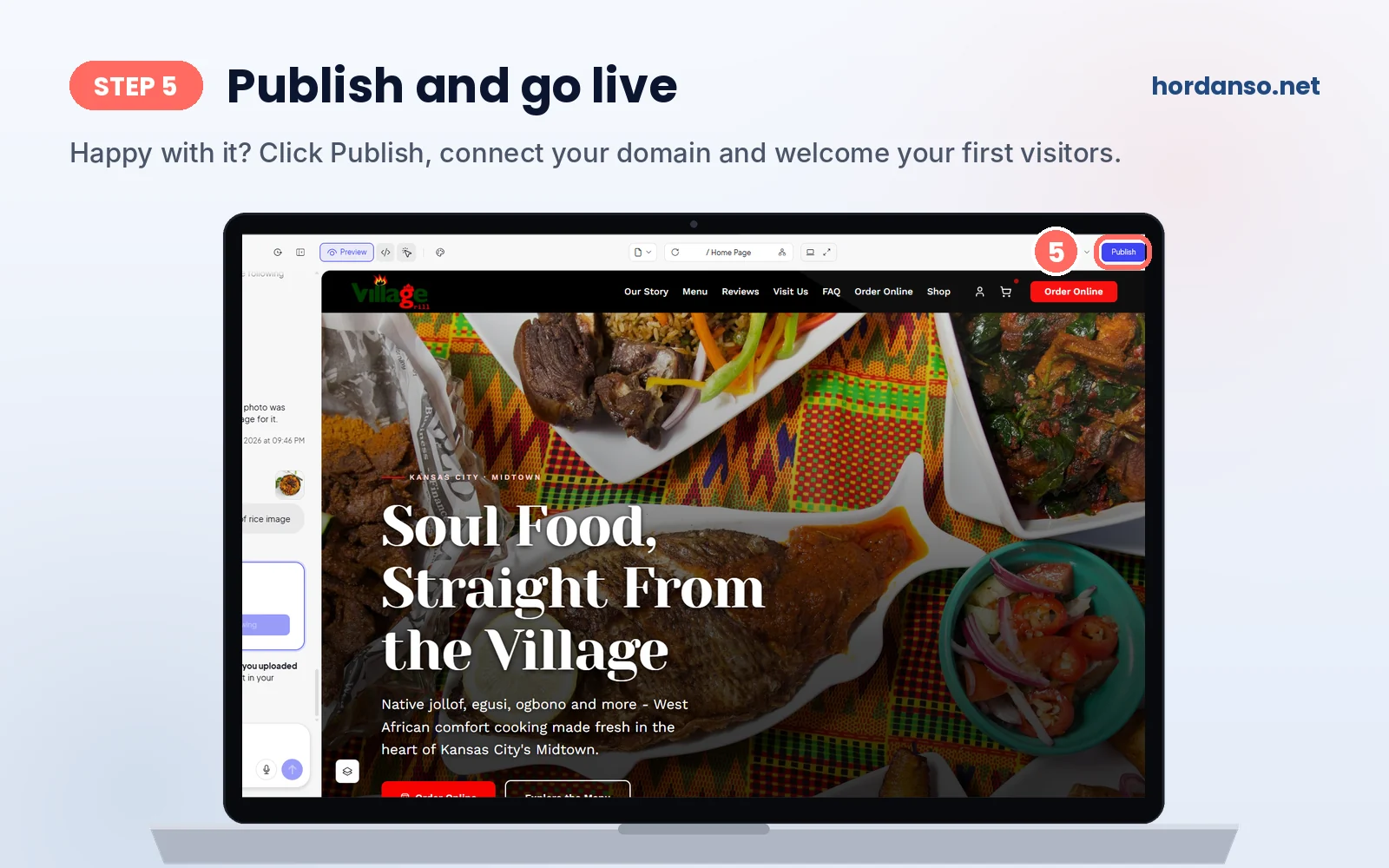
When your site looks right, click Publish in the top right corner of the editor. Before you share your link with customers, take care of three things that make a business look professional online:
- Connect your own domain name, such as yourbusiness.com.ng or yourbusiness.com. If you do not have one yet, start with domain registration.
- Set up business email so customers write to you at an address like [email protected] instead of a free email account.
- Test your site on your phone, because most of your visitors will arrive from one. Tap every button, open every page and send yourself a message through your contact form.
Common Mistakes and How to Avoid Them
| Mistake | What happens | Do this instead |
|---|---|---|
| Writing a one-line description | The AI has little to work with, so the copy feels generic | Use most of your 500 characters: offer, customers, location and tone |
| Keeping placeholder images | Visitors can tell, and trust drops | Attach your own photos in the AI chat |
| Regenerating whole pages for small fixes | You use up AI credits quickly | Ask for one specific change at a time |
| Only checking the site on a laptop | Problems on phones go unnoticed | Test on at least two phones before you publish |
| Making big changes on the live site | Visitors see half finished pages | Try big changes in your staging environment first |
Check Your Speed Before You Share Your Link
A fast site keeps visitors on the page. Google’s Web Vitals guide sets clear targets for a good experience.
| Metric | What it measures | Good result |
|---|---|---|
| Largest Contentful Paint (LCP) | How fast the main content appears | 2.5 seconds or less |
| Interaction to Next Paint (INP) | How quickly the page responds when someone taps or clicks | 200 milliseconds or less |
| Cumulative Layout Shift (CLS) | How much the page jumps around while loading | 0.1 or less |
Large photos are the most common reason a new site feels slow, so resize your images before you upload them. Google’s SEO Starter Guide is also worth a read once you are live, to help customers find you in search.
Quick Self-Check: Is Your Site Ready to Publish?
Answer each question. If you can tick Yes on all of them, your site is ready for real customers.
| Question | Yes | No |
|---|---|---|
| Have you replaced all placeholder text with your real details? | ||
| Are your phone number, WhatsApp, address and opening hours correct? | ||
| Have you swapped placeholder images for your own photos? | ||
| Does every page look good and work on your phone? | ||
| Did a test message through your contact form reach you? | ||
| Is your own domain name connected? |
Try It Free, Then Pick a Plan
You can test the whole process with the 3 day free trial, which includes 1 website, 10 GB of SSD storage, 10K monthly visitors and 100 AI credits, with the same base features as the Starter plan. When you are ready to continue, choose the plan that fits how you will use your site.
| Feature | Free Trial | Starter | Business | Agency |
|---|---|---|---|---|
| Websites | 1 | 1 | 2 | 5, up to 10 on request |
| Monthly visitors | 10K | 10K | 20K | 50K |
| SSD storage | 10 GB | 10 GB | 15 GB | 25 GB |
| AI credits per month | 100 | 100 | 200 | 300 |
| Ecommerce dashboard | No | No | Yes | Yes |
| Local SEO tools | No | No | Yes | Yes |
| Cloudflare CDN | No | No | No | Yes |
Every plan runs on Google Cloud Platform and includes free SSL, the AI logo maker, a staging environment, automatic daily backups and 24/7 support by live chat, email and WhatsApp. You can pay in Naira through Paystack, Flutterwave, bank transfer or card, with billing also available in US dollars, pounds and euros. See current prices on the Agentic WordPress Hosting page.
Black Friday at Hordanso: get 20% off eligible plans with code BLACKFRIDAY26 until November 30, 2026. Domains are excluded.
See the PlansAlready Have a Website?
You do not have to start from scratch. If you already run a WordPress site with another host, the Hordanso team moves your files, databases, emails and settings with no downtime, usually within a few hours, at no extra cost for new customers. If you prefer to build and manage WordPress yourself, see our standard WordPress Hosting plans instead.
Key Terms, Explained Simply
- AI website builder: A tool that creates the first version of a website, including layout, pages and text, from a short description of your business.
- Business brief: The short description you give the builder about what you offer, who your customers are, where you are and the tone you want.
- AI prompt: A plain English instruction you type to the AI, such as “add our opening hours to the contact page”.
- AI credits: A monthly allowance used up each time you generate or edit content with the AI tools.
- Code diff: A view that shows exactly what changed in your site’s code after an edit.
- Staging environment: A private copy of your site where you can test changes before visitors see them.
- WordPress: The website platform your Hordanso AI site is built on, used by millions of websites around the world.
Need a hand with your brief or your first edits? Our team can help.
Talk to Our TeamFrequently Asked Questions
The builder usually creates your first version in 2 to 4 minutes after you submit your business brief. Most people then spend a little longer refining the text and photos before they publish.
No. You describe your business in plain English, the AI builds the site, and you make changes by typing requests into the Ask Hordanso AI chat. No technical knowledge is needed.
Yes. The builder creates a professional WordPress website, and you can keep refining it in the WordPress editor with more AI prompts.
Up to 500 characters, which is about 80 to 100 words. Cover what you offer, who your customers are, where you are based and the tone you want. You can expand your copy later with more AI prompts.
Yes. Attach a photo in the AI chat and tell the AI where it should go, for example as the main image on your home page or as a product image.
Yes. After each edit, a Latest Modification card shows the change, with a Code diff button and a live preview of your site.
Yes. The free trial lasts 3 days and includes 1 website, 10 GB of SSD storage, 10K monthly visitors and 100 AI credits, with the same base features as the Starter plan.
Yes. You can connect a domain you already own or register a new one with Hordanso, and set up business email so customers see a professional address.
Yes. Naira billing is supported, along with US dollars, pounds and euros. Accepted payment methods include Paystack, Flutterwave, bank transfer and card.
Hordanso is running a Black Friday offer of 20% off eligible plans with code BLACKFRIDAY26 until November 30, 2026. Domains are excluded.
Sources and Further Reading
- Hordanso AI Website Builder, where you start your build.
- Hordanso Agentic WordPress Hosting, for current trial and plan details and pricing in your currency.
- web.dev: Web Vitals, for the speed and experience targets used in this guide.
- Google Search Central: SEO Starter Guide, for helping customers find your new site.


