

Email forwarding is a fundamental tool that enables you to redirect incoming emails from one address to another automatically or manually. For businesses, entrepreneurs, and professionals managing multiple email addresses or domains, email forwarding streamlines communication, reduces missed messages, and helps maintain professionalism.
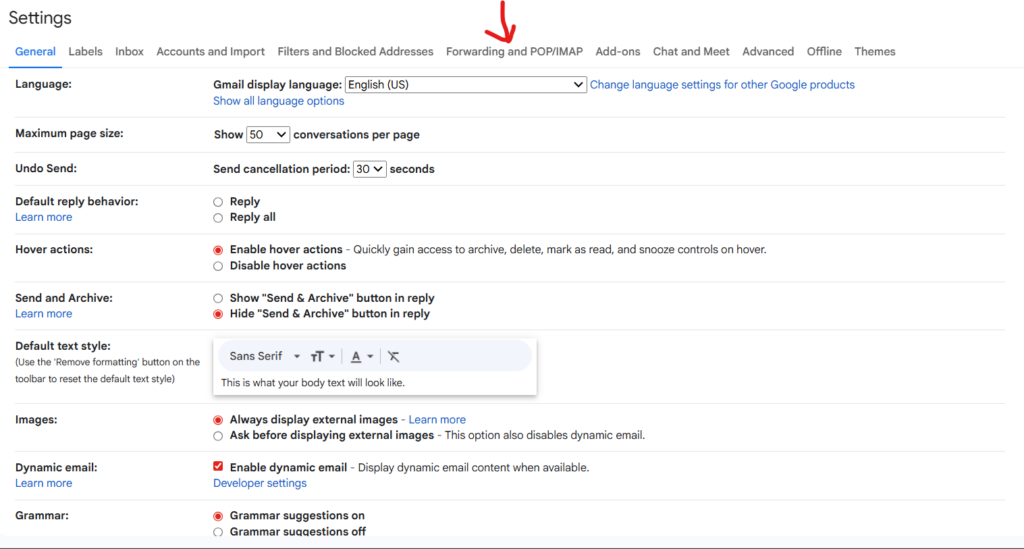
To forward an email manually, open the message, click the ‘Forward’ option in your email client (such as Gmail or Outlook), add the recipient’s address, include any additional information, and hit send. For setups requiring automation, platforms like cPanel allow you to configure rules that forward all messages for an email account to one or more destinations. Hordanso offers a step-by-step guide on setting up email on your domain for better deliverability, which includes best practices for professional businesses.
Setting Up Email Forwarding
To streamline your communications and manage multiple email addresses from a single inbox, setting up email forwarding is an essential productivity move for businesses and entrepreneurs. Begin by logging into your email provider or your domain’s control panel (such as cPanel, Plesk, or a dedicated dashboard offered by your hosting provider). Look for the section labeled “Email” or “Mail,” then locate the “Forwarders” or “Email Forwarding” option.
Click “Add Forwarder” (or a similar prompt), then enter the email address you wish to forward from—this is typically your custom domain address (e.g., info@yourcompany.com). Next, specify the destination email address where you want incoming messages to be sent, for example, a personal Gmail or another business account. Save these settings to activate email forwarding immediately.
Benefits of Email Forwarding for Businesses
Email forwarding provides businesses and entrepreneurs with a range of strategic advantages. By setting up email forwarding on a custom domain such as info@yourcompany.ng you convey professionalism, enhance brand credibility, and create a unified identity that customers trust. To explore more about boosting your company’s professional image with domain-based email, see our guide on why using a domain email address can help you win clients.
Common Email Forwarding Issues
Email forwarding is a valuable feature for businesses looking to streamline communication, but it’s not without its challenges. Here are the most frequent issues entrepreneurs and SMEs may face, along with actionable solutions:
- Forwarding Loops: These occur when emails continuously bounce between two or more addresses, resulting in undelivered messages and potential server overload. Tools like the cPanel interface make it easier to review and clean up forwarders—learn more in our guide to setting up domain email for better deliverability.
- Missed Emails: Sometimes forwarded emails are not delivered to the destination inbox due to spam filtering or incorrect recipient addresses. Hordanso’s email setup guides highlight ways to reinforce deliverability—see practical tips in our complete setup guide to sending and receiving domain emails in Gmail.
- Misconfigured Settings: Small missteps during initial configuration can lead to forwarding failures. For a foundational understanding of maintaining healthy domain and web hosting environments, review our breakdown of the difference between web hosting and domain names.
- Security and Privacy Risks: Forwarded emails can accidentally leak confidential information if directed to incorrect addresses. Our comprehensive guide to spotting phishing attempts can help keep your business safe.
Best Practices for Email Forwarding
Email forwarding can be a powerful tool for businesses, but using it effectively requires thoughtful setup and careful management. Start by establishing filters that automatically sort forwarded emails into relevant folders. For a practical guide on integrating your domain email with leading clients, see our article on how to send and receive your domain email in Gmail.
To guard against risks like phishing, implement tools such as spam filters and enable two-factor authentication (2FA) on all email accounts involved. Our comprehensive guide on how to spot phishing attempts will equip your team with detection strategies.
Conclusion
Mastering email forwarding can be a game changer for entrepreneurs and businesses looking to maintain seamless communication. By setting up effective email forwarding, you ensure important messages are never missed, streamline your workflow, and allow team members to respond quickly from anywhere and on any device. For more on improving business operations through digital tools, discover our everyday productivity hacks for small teams and stay ahead in the fast-evolving digital landscape.